jdBasic Update: Building Modern UIs with Immediate Mode GUI (ImGui)
Introduction
When I started building jdBasic, my goal was to create a modern interpreter that felt like the classic BASICs of the 80s but with the power of C++ under the hood. It started with simple console I/O, then gained sprite graphics and sound with SDL3.
But there was one thing missing: User Interfaces.
If you wanted to build a level editor, a database manager, or a debugging tool in jdBasic, you had to draw your own buttons and handle your own mouse clicks. That changes today.
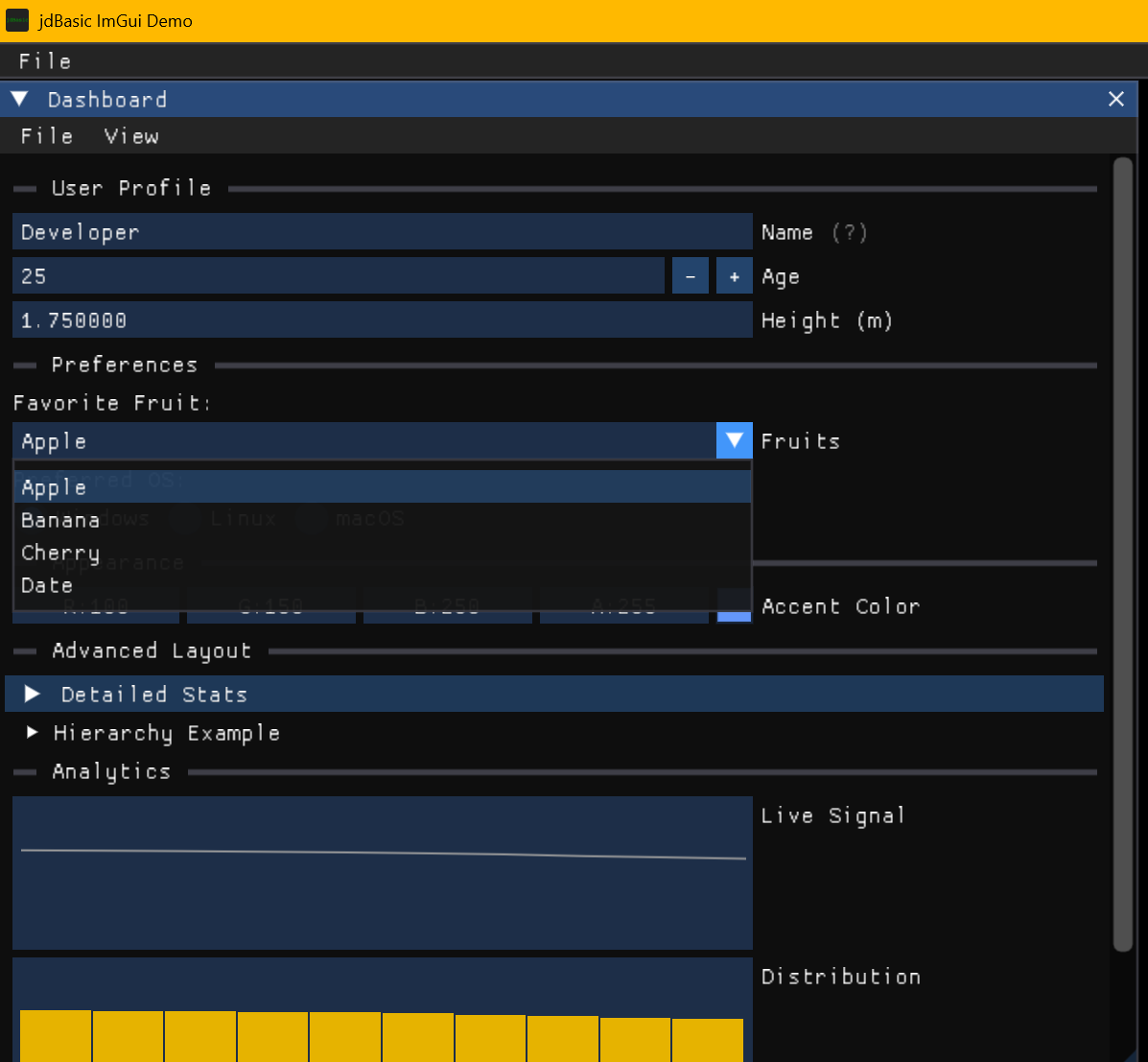
I have integrated Dear ImGui directly into the language. This means you can now create professional-grade windows, menus, inputs, and plots using simple, declarative BASIC commands.
Why Immediate Mode?
For an interpreter like jdBasic, "Immediate Mode" GUI is a perfect fit. Instead of creating objects, setting callbacks, and managing complex state (Retained Mode), you just describe your UI every frame inside your main loop.
If you want a button, you just ask for it:
IF GUI.BUTTON("Click Me") THEN
    PRINT "Button was clicked!"
ENDIF
This stateless approach aligns perfectly with the procedural nature of BASIC.
New Features Overview
The new GUI command set covers almost everything you need to build functional applications.
1. Windows and Layouts
You aren't stuck with a single graphics window anymore. You can create movable, resizable windows, tabs, and child regions.
WindowOpen = GUI.BEGIN("My Tool", 50, 50, 300, 200, WindowOpen)
    GUI.TEXT "This is a floating window inside jdBasic!"
    GUI.SEPARATOR
    GUI.TEXT "It handles its own state."
GUI.END
2. Rich Input Widgets
We've gone beyond INPUT. You now have access to:
GUI.INPUT: Text fieldsGUI.SLIDER: Draggable number slidersGUI.CHECKBOX&GUI.RADIO: Toggles and optionsGUI.COLOR: Full RGB/Alpha color pickersGUI.COMBO&GUI.LISTBOX: Dropdowns and lists
3. Data Visualization
Need to debug a sensor or show game stats? You can plot data arrays directly.
' Visualize an array of data as a histogram
GUI.PLOT_HISTOGRAM("CPU Load", LoadHistoryArray, "Usage", 0.0, 100.0)
4. Menus and Popups
You can add a full menu bar to your main window or create right-click context menus and modal popups for dialogs.
IF GUI.BEGIN_MAIN_MENU_BAR() THEN
    IF GUI.BEGIN_MENU("File") THEN
        IF GUI.MENU_ITEM("Exit") THEN STOP
        GUI.END_MENU()
    ENDIF
    GUI.END_MAIN_MENU_BAR()
ENDIF
Real-World Example: A SQLite Database Manager
To prove the power of this integration, I built a fully functional Database CRUD (Create, Read, Update, Delete) application entirely in jdBasic.
It uses the sqlitefunc module for backend logic and the new GUI commands for the frontend.
Here is a snippet of the main loop:
' ... setup code ...

DO
    CLS
    WindowOpen = GUI.BEGIN("User Manager", 50, 50, 800, 600, WindowOpen, GUI.FLAG("MENUBAR"))

    ' Render the list of users
    GUI.BEGIN_CHILD("ScrollingRegion", 0, 300, TRUE)
        FOR i = 0 TO LEN(UserList) - 1
            ' Create a unique ID scope for buttons in this loop
            GUI.PUSH_ID(i)

            ' Draw the row
            line$ = FORMAT$("{:3} | {:20} | {:5}", id, name$, score)
            IF GUI.SELECTABLE(line$, SelectedID = id) THEN SelectedID = id

            GUI.SAME_LINE
            IF GUI.BUTTON("Edit") THEN OpenEditPopup = TRUE

            GUI.POP_ID()
        NEXT i
    GUI.END_CHILD()

    ' ... popup handling ...

    GUI.END
    SCREENFLIP
LOOP
This script creates a scrollable list of users from a SQLite database, complete with selectable rows and action buttons for each entry.
Under the Hood: C++ Integration
Binding ImGui to an interpreter involves mapping the C++ types to jdBasic's BasicValue variant system.
One interesting challenge was handling ImGui::Begin. In C++, it takes a bool* p_open to handle the close button. Since jdBasic passes arguments by value, I couldn't just modify the variable.
The solution was to make GUI.BEGIN return the new state of the window:
// C++ Binding Implementation
BasicValue gui_begin(NeReLaBasic& vm, const std::vector<BasicValue>& args) {
    // ... setup args ...
    bool is_open = to_bool(args.back());

    // ImGui modifies this boolean if the X is clicked
    ImGui::Begin(title.c_str(), &is_open, flags);

    // We return the new state to the interpreter
    return is_open;
}
This requires a slightly different pattern in BASIC, but it keeps the logic explicit:
' Update the variable with the return value
IsWindowOpen = GUI.BEGIN("Title", ..., IsWindowOpen)
What's Next?
With these tools, jdBasic is now capable of building its own IDE features inside itself! I plan to use these features to build a visual debugger and a tilemap editor for the game engine component.
If you are interested in interpreter development or just love BASIC, check out the project on GitHub!
Thanks for reading! Let me know in the comments if you prefer Immediate Mode or Retained Mode GUIs.