Building "Mini Calc": An Excel-Like Spreadsheet in jdBasic
Introduction
One of the ultimate tests for any programming language environment is building a spreadsheet. It combines data structures, complex UI logic, formula parsing, and file management into a single package.
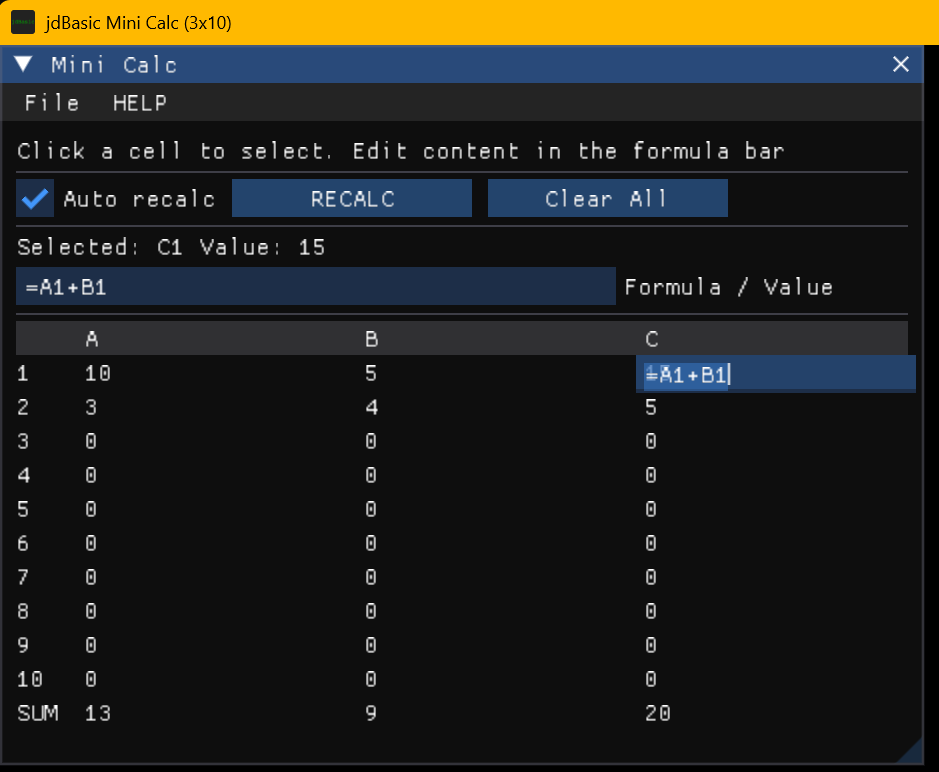
With the recent addition of Dear ImGui integration to jdBasic, I decided to tackle this challenge. The result is Mini Calc, a fully functional 3x10 spreadsheet application written entirely in BASIC code.
Core Features
- Grid Interface: Built using ImGui Tables (`GUI.BEGIN_TABLE`) with selectable rows and columns.
- Formula Engine: Uses `jdBasic`'s powerful `EVAL()` function to parse and calculate cell formulas like `=A1+B1`.
- Dependency Resolution: A multi-pass iterative solver handles forward references (e.g., A1 depending on A2).
- File I/O: Save and Load spreadsheets to `.jdc` (JSON) files.
- Direct Editing: Click any cell to edit its value or formula in place.
The Calculation Engine
The heart of Mini Calc is the `CALC_SHEET` function. It takes the raw string grid (formulas) and produces a numeric grid (results).
Because `jdBasic` is interpreted, I could leverage the built-in `EVAL` function to do the heavy lifting of math parsing. The tricky part was resolving cell references like "A1". I used regex replacement to swap "A1" with the actual value from the previous pass.
' --- Core calculation (iterative so forward refs also work) ---
FUNC CALC_SHEET(CELLTXT$)
    DIM OUT[ROWS, COLS] AS DOUBLE

    ' Pass 2+: iterate formulas a few times (mini-excel style)
    FOR iter = 1 TO 12
        FOR r = 0 TO ROWS - 1
            FOR c = 0 TO COLS - 1
                raw$ = TRIM$(CELLTXT$[r, c])
                IF raw$ <> "" AND LEFT$(raw$, 1) = "=" THEN
                    expr$ = MID$(raw$, 1) ' strip "="

                    ' Replace refs A1.. with values using Regex
                    FOR rr = ROWS - 1 TO 0 STEP DECI
                        FOR cc = 0 TO COLS - 1
                            ref$ = CELLNAME$(rr, cc)
                            pat$ = "\b" + ref$ + "\b"
                            expr$ = REGEX.REPLACE(pat$, expr$, STR$(OUT[rr, cc]))
                        NEXT cc
                    NEXT rr

                    val = 0
                    TRY
                        val = EVAL("(" + expr$ + ")")
                    CATCH
                        val = 0
                    ENDTRY

                    OUT[r, c] = val
                ENDIF
            NEXT c
        NEXT r
    NEXT iter

    RETURN OUT
ENDFUNC
The User Interface
The UI is drawn inside a standard `DO...LOOP`. I used `GUI.BEGIN_TABLE` to create the grid layout. A nice trick I used here is determining if a cell was clicked using `GUI.SELECTABLE` and then overlaying an input box if it is the active cell.
IF GUI.BEGIN_TABLE("sheet", 4, 0) THEN
    ' Setup columns...
    GUI.TABLE_HEADERS_ROW

    FOR r = 0 TO ROWS - 1
        GUI.TABLE_NEXT_ROW
        GUI.TABLE_SET_COLUMN_INDEX(0)
        GUI.TEXT STR$(r+1)

        FOR c = 0 TO COLS - 1
            GUI.TABLE_SET_COLUMN_INDEX c+1

            ' Display calculated value
            disp$ = FORMAT$("{:.6g}", CDBL(Sheet[r, c]))

            ' Handle Selection
            IF GUI.SELECTABLE(disp$, (r=SelR AND c=SelC), 0, 0, 0) THEN
                SelR = r : SelC = c
                ' Trigger edit mode logic...
            ENDIF
        NEXT c
    NEXT r
    GUI.END_TABLE
ENDIF
File Persistence
For saving, I used `JSON.STRINGIFY$` to pack the entire spreadsheet state (dimensions and cell formulas) into a JSON string, which is then written to disk. Loading is just the reverse using `JSON.PARSE$` and `RESHAPE` to restore the 2D array.
SUB SAVE_JDC(name$, CELLTXT$)
    fname$ = JDC_FILE$(name$)
    IF fname$ = "" THEN RETURN

    payload = {"rows": ROWS, "cols": COLS, "cell": CELLTXT$}
    s = JSON.STRINGIFY$(payload)

    TXTWRITER fname$, s
ENDSUB
Conclusion
This project demonstrates that `jdBasic` isn't just a toy language. By combining modern C++ features like ImGui and JSON with the simplicity of BASIC, you can build complex, interactive GUI applications with surprisingly little code.
You can find the full source code for "Mini Calc" in the examples folder of the jdBasic repository!
Have you tried building a GUI app in jdBasic yet? Share your creations!